New Features
Versa Documentation
Versa Desktop
You Can Now Change The Font For All Of Versa

A validation summary now appears below the rest of the controls on the interface add/edit form.
The validation summary displays any validation errors that occurr when you are editing a line item.
You can use the validation summary to quickly read the errors without having to mouse over the fields that have errors on them.
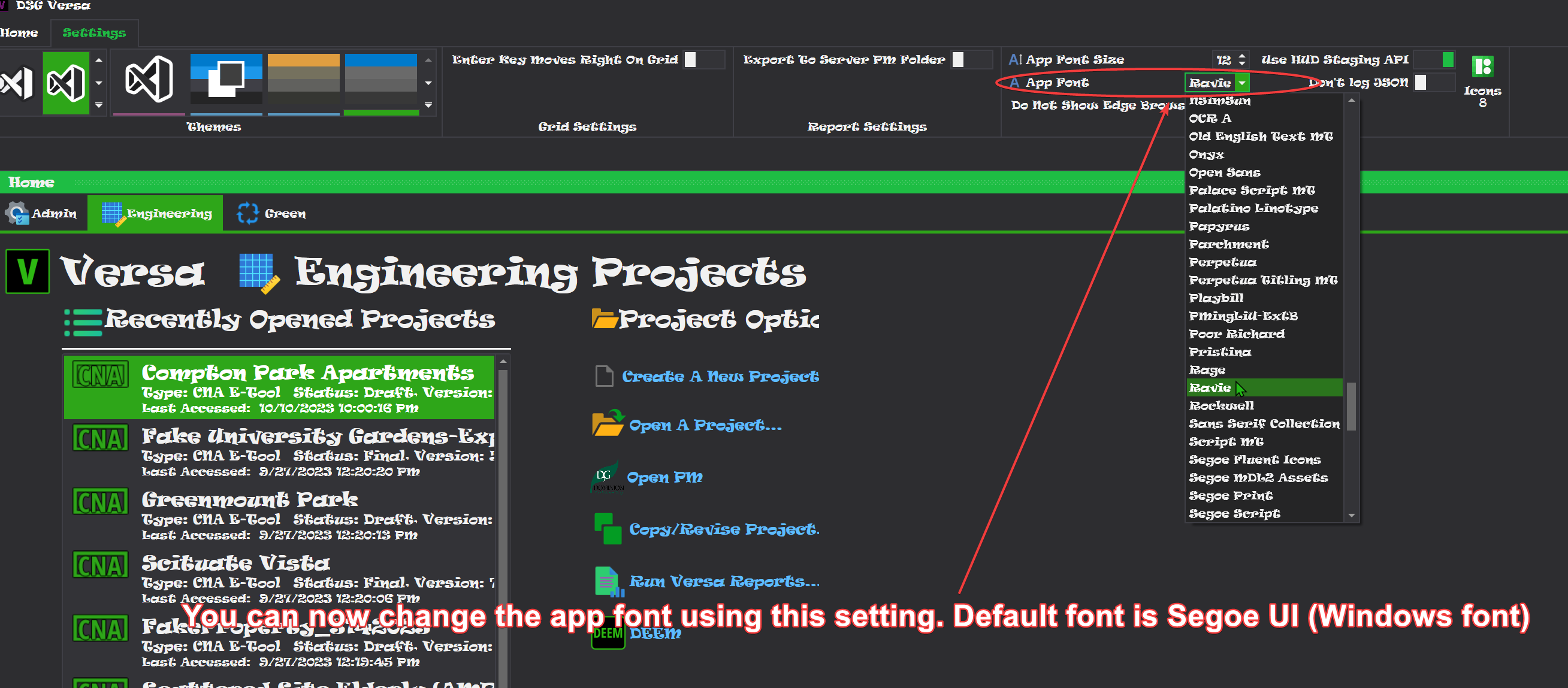
You can now change the default font Versa uses for most of its UI elements.
To change the font, open Versa up, click the "Settings" section on the ribbon and then change the font in the new "App Font" combo box on the "Other Settings" section of the Ribbon.
- The font you select will get saved to your settings file, so Versa will remember it after you restart the app.
The Interface Form Now Shows A Validation Summary
Utilities Screen Replaced
- This screen has been removed from Versa Desktop.
- The navigation menu item(s) for it now open the page for it in Versa Online, in your default browser (see below).
Fixture Areas Screen Replaced
- This screen has been removed from Versa Desktop.
- It has been replaced with two navigation menu items: Water Fixture Areas and Lighting Fixture Areas.
- Clicking on either of them will open their respective page in Versa Online (see below).
Energy Audit Data Screen Replaced
- This screen has been removed from Versa Desktop.
- The navigation menu item(s) for it now open the page for it in Versa Online, in your default browser (see below).
Energy Audit Segment Two Screen Replaced
- This screen has been removed from Versa Desktop.
- The navigation menu item(s) for it now open the page for it in Versa Online, in your default browser (see below).
Admin Panel Removed
- The admin tab on the home screen for versa Online has been removed.
- All of its functionality has been moved to Axiom / Versa Online.
Versa Online
- Parts of this update includes moving much of the Energy Audit functionality to Versa Online.
Energy Utilities
- This page replaces the Utilities screen from Versa Desktop.
- This page functions differently than it did in Versa Desktop, save for the fact that it still uses a data grid.
- For more information, please click here to see the documentation
Water Fixture Areas
- This page replaces the data entry for water fixture areas, which was previously done in the fixture areas screen in Versa Desktop.
- Parts of it are similar to the version in Versa Desktop, but it is easier to use.
- For More Information, please click here to see the documentation
Lighting Fixture Areas
- This page replaces the data entry for lighting fixture areas, which was previously done in a convoluted fixture areas screen in Versa Desktop.
- As with water fixture areas above, parts of this page are similar and easier to use compared to the desktop precesor.
- For More Information, please click here to see the documentation(same link as previous one)
Energy Audit Data Page
- This page replaces the Energy Audit Data screen in Versa Desktop.
- It is nearly identical to the one in desktop.
- For More Information, please click here to see the documentation
Energy Audit Segment Two Page
- This page replaces the same named screen in Versa Desktop.
- It is nearly identical to the one in desktop.
- For more information, please click here to see the documentation
Component Library / Versa Online Admin
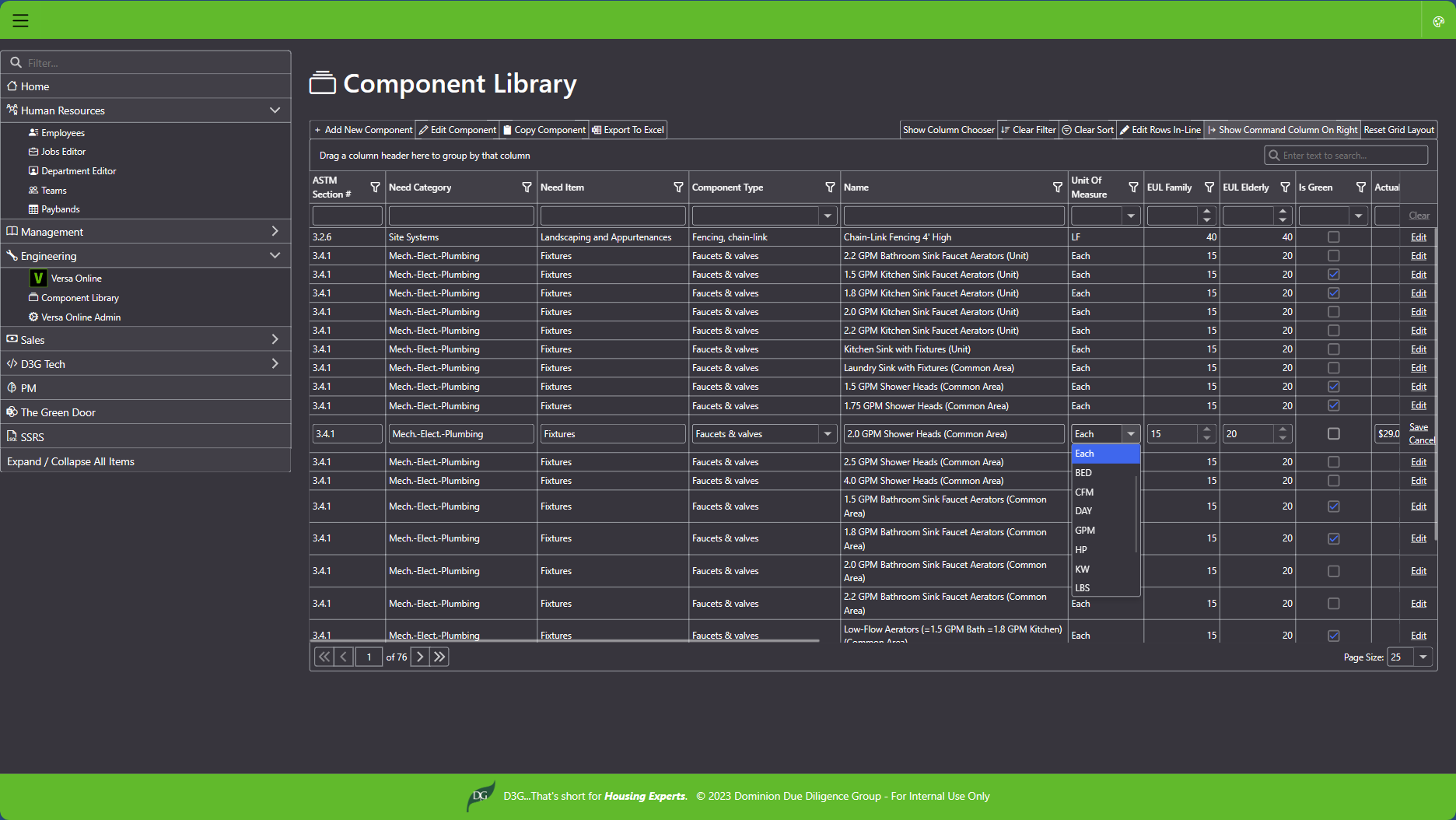
- The component library page replaces the same screen in Versa Desktop.
- If you are an admin in Versa, you should be able to access it via https://axiom.d3g.com
- Look for the link to the component library under the engineering section of the navigation menu.
- Likewise, all of the admin screens have been replaced with an admin page in Versa Online.
- The link to it can be found below the component library link on the nav menu in Axiom.

Maintenance / Other Changes
- Updated Versa Desktop to Dot Net 7.0.12 - mostly a security patch from MSFT, no other significant changes.
- Updated Axiom / Versa Online to Dot Net 7.0.12 - same as above.
- Updated other packages/dependencies for Versa Desktop.