8-29-2023 Hotfix Notes
Bug Fixes
Sites Screen
- Fixed a bug that was causing the sites validator to throw an unhandled exception / error when it was trying to validate the address for a site.
New Features
Lightweight Themes for WPF
- This update for Versa includes an upgrade for DevExpress WPF, which includes a new lightweight version of the theme engine Versa uses.
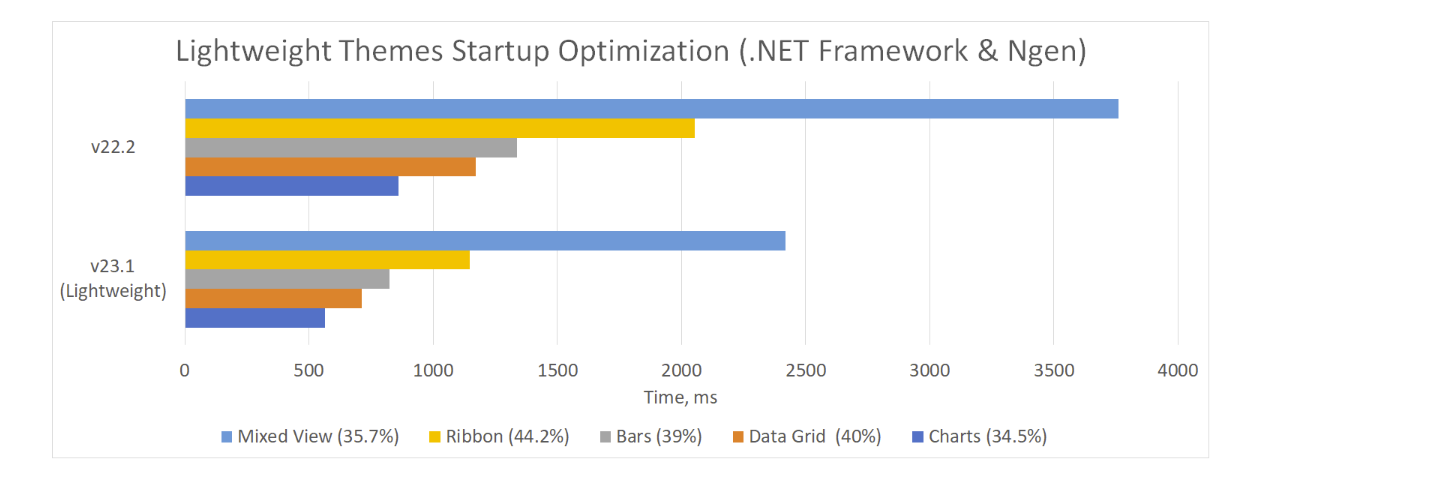
- As you can see from the chart below, the lightweight themes should provide significantly better startup times for the application versus the classic/default themes.
- If you encounter any graphical issues and/or other problems that may be related to the new theme engine, please let IT know.
Lightweight Theme Performance Comparison vs Regular / Classic Themes:
Startup / Loading Times:
Memory Usage:

Known Issues With the New Lightweight Themes:
- The lightweight theme engine does not produce icons that preview the colors for a palette in the palette gallery. You will still see the name of the palette in the palette gallery.
Theme changes
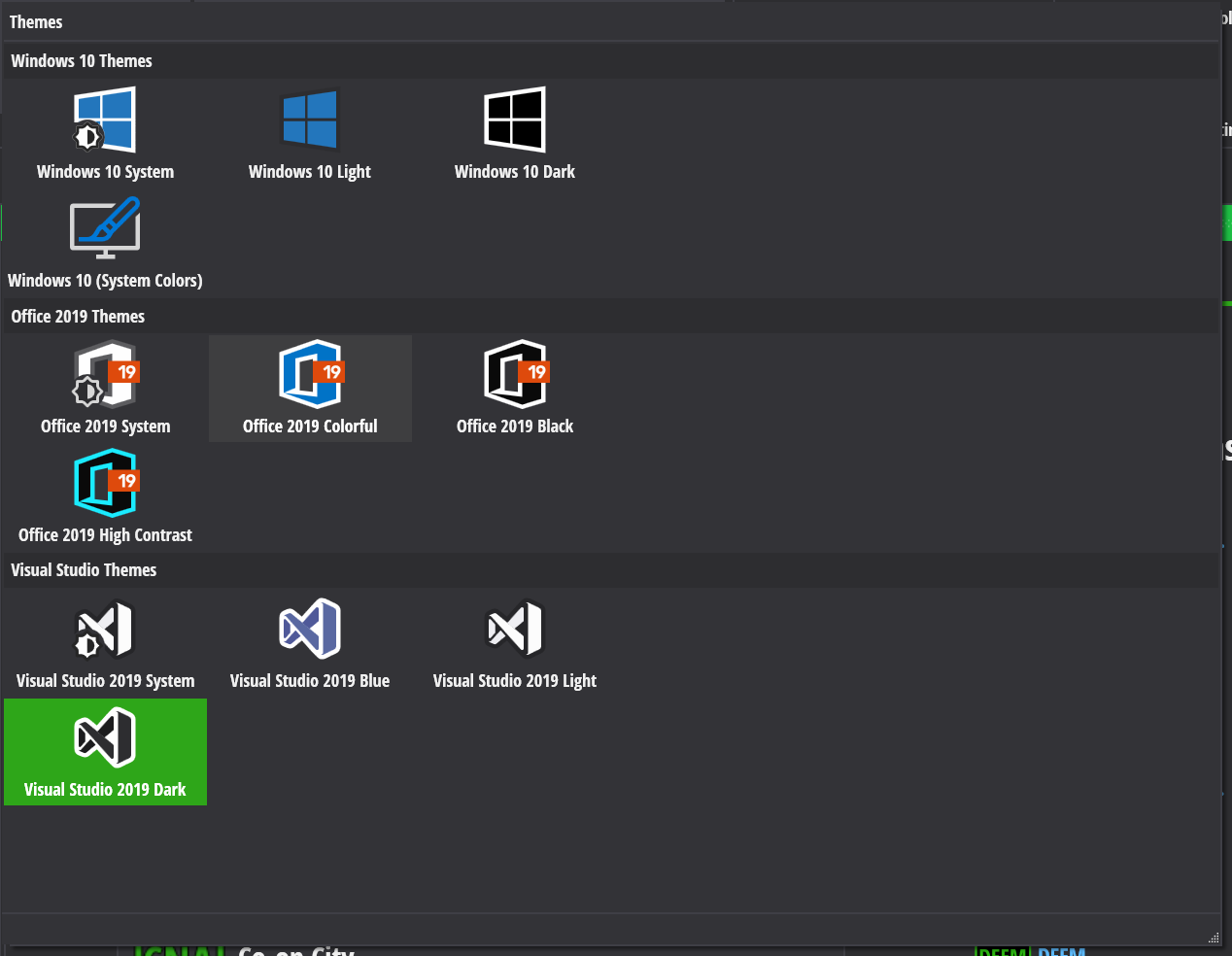
- With the introduction of the lightweight themes, Versa now features the following themes. If a theme has color palettes, it will be noted below with an asterisk.
Theme Gallery For Versa as Of 8-23-2023
Themes List:
- Windows 10 Dark (Replaces Windows 11 Dark)
- Windows 10 Light (Replaces Windows 11 Light)
- Windows 10 System (Uses the system preference for dark / light mode)
- Windows 10 System Colors (Uses the system preference for dark / light and also uses the accent color)
- Visual Studio 2019 Dark*
- Visual Studio 2019 Light*
- Visual Studio 2019 Blue*
- Visual Studio 2019 System (uses the system preference for dark / light mode)
- Office 2019 Black*
- Office 2019 Colorful*
- Office 2019 High Contrast
- Office 2019 System (uses the system preference for dark / light mode)
The default theme for Versa is the Visual Studio 2019 Dark theme w/ the D3G color palette.
We retired the following color palettes for the Visual Studio themes due to lack of use. If for some reason you would like it back or have suggestions for a new one, please let IT know.
- Witchrave
- Cherry Ink
- Nebula
- Moray Eel
- Nebula
If you were using a theme or color palette that is no longer available and/or retired, Versa should default back to the Visual Studio 2019 Dark D3G theme. You can change the theme for Versa, as usual, by going to the settings section on the ribbon at the top of Versa.
Bug Fixes
Interface Screen
- Versa will now display validation errors if a line item is missing a repair category when it is marked as "Replace Now".

Indicated Alternative should now get updated when changes are made to alternative pricing / utility types / usage units.
The Interface Line Item form will now set the default price for alternatives when location factor is turned on, while in Add New mode.
Fixed a typo on the Interface Add/Edit form (Utility Paid by Owner was misspelled).
Removed the unused validation check on Alternative Item utility usage since this is only relevant for E-Tool exports.
- Note: You will still receive a warning on E-Tool exports if an alternative's usage is zero when export usages is enabled for the project.
Sites Screen
- Under certain circumstances, one could accidentally delete a site's address information and save it to the database. This has been fixed.
Participants Screen
- Under certain circumstances, one could accidentally delete a participant's address information and save it to the database. This has been fixed.
Inspected Units
We fixed a long standing bug where the inspected units screen would lag every time a row for an inspected unit was clicked.
- This was due to the fact that Versa was trying to load the unit types belonging to the building associated with the inspected unit.
- This lag was more noticable on long distance connections using the VPN.
- Versa now will fully load the buildings, units and unit types when the inspected units screen is opened to avoid these unessessary database calls to hopefully cut down on this potential lag.
Added a new error message that will display if you select a building containing orphaned Units via the Buildings combo boxes / drop downs.
- This normally should not happen, but in the event a building contains orphaned units, IT has to remove them since Versa itself cannot display the orphaned records.
Report Center
- The Reserves Grid was not displaying validation errors if the user entered a duration that was invalid (I.E. The number was higher than was divisible into the EUL).
- Versa wil now display a validation error in the event the duration for a reserve is too high.
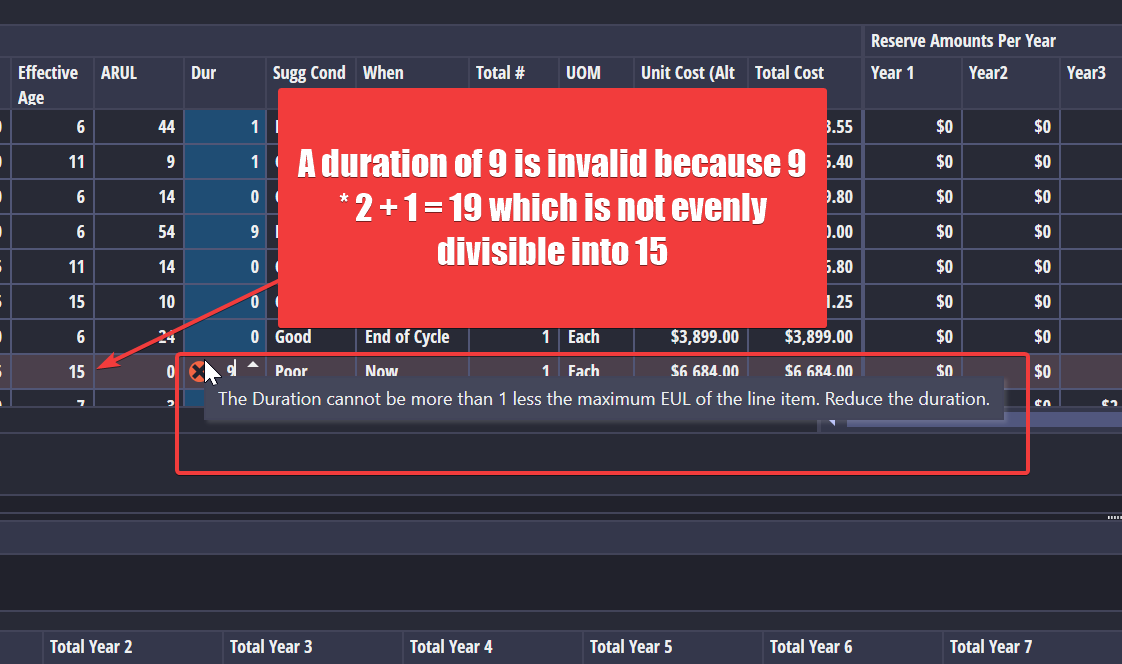
- Versa wil now display a validation error in the event the duration for a reserve is too high.
Units Screen
- The add/edit unit form had a label at the top of it for a non-existant "Unit Name" field. This label has been removed.
Spell Checker
- There was a bug with the DevExpress spell checker where it would throw an error and cause Versa to freeze when trying to display the spell checker window. This should be fixed with this update.
Components Library
- Components edited and saved should now have their last edited by and last edited date time fields adjusted.
- NOTE: The component library will be getting moved to Versa Online in the very near future.
Versa Reports
- Running a reserve report for a project that had improper end of cycle items would result in a misleading error message. The correct error now should display.
Other Changes
Removed the Report Designer from Versa Desktop
- This has been moved to Versa Online; IT should now use https://axiom.d3g.com for making changes to the Versa report templates.
Updated DevExpress WPF to version 2023.1.5
- This update provides the new lightweight theme engine for WPF along with the latest potential new features for Versa.
Updated DotNet version Versa uses to 7.0.10
- We updated the version of DotNet that Versa uses to the latest version to keep up with security and bug fixes from Microsoft
Added new Single Validate method for Versa.Core's validator classes
- This was a change needed for Versa Online. This should have no effect on Versa Desktop.
Added a new interface for the BuildingTypeService used by the Buildings Screen in Versa
- The buildings screen and property information screens have been updated to use the new interface, they should still behave the same.
Removed the default theme libraries from Versa
- They have been replaced by the smaller, all-in-one lightweight library that Versa uses. This should hopefully reduce the installation size of Versa.
Removed the reference to DevExpress.Reporting in Versa.Core
- Versa.Core was not using this library and it was adding bloat to Versa's installation.