New Features
Dot Net 7 / DevExpress 2022.2
Versa has been updated to the latest version of Dot Net (from Microsoft) and DevExpres' WPF suite. This adds some new features to Versa's capabilities as well as various performance and stability improvements from Microsoft.
Windows 11 Theme
Versa now has access to the new Windows 11 theme, which you can access via the settings section on the ribbon in Versa (see below).

NOTE: The Windows 11 theme currently does NOT support color palettes.
Closable / Minimizable Splash Screen
We added a close and minimize button to the splash screen for Versa.

- Clicking the minimize button will hide the splash screen and Versa will continue to load in the background until it is ready. THe Versa main window will pop up when it is done loading, as normal.
- Clicking the close button will shut down Versa (and stop the splash screen).
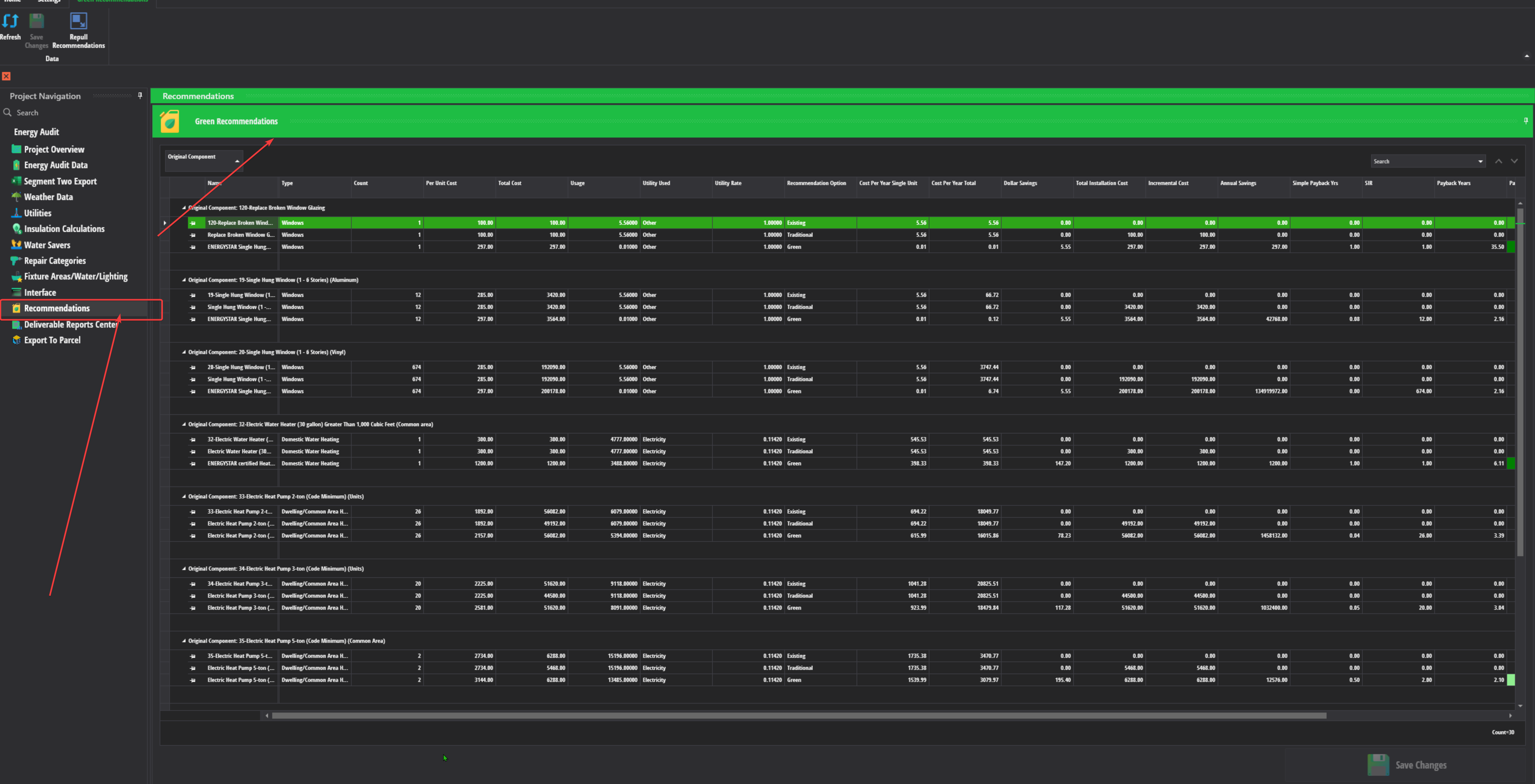
New Recommendations Screen For Green
Green / Energy now has a new screen that allows them to pull their recommendations from the Interface and adjust them.
In the future, this will allow green to make adjustments to the recommendations before exporting them to Parcel.
Versa now tracks copied / imported projects
Starting with this version, Versa will now record the original project when you make a copy of it.
Versa will also record the imported project as the original project when you use the import feature in making a new project.
Finally, when you perform a roll up, Versa will record the primary project's original copy as the original project.

NOTE: Projects made prior to this version of Versa will not show the original project since we were not tracking this previously. We may be able to discern the original in cases where it's obvious. However, we do not have any plans right now to fill in the blanks.
Improvements
The backup interface and restore backup buttons on the interface screen now have tooltips that help explain usage of these features.

- If you want to keep a backup of your interface data while you are working, you need to do it manually right now.
- This is recommended if you are working long distance from Richmond or have spotty internet.
- To restore the backup, you need to select the file that was created with the backup feature.
- This feature is still experimental and needs feedback.
- If you want to keep a backup of your interface data while you are working, you need to do it manually right now.
Flag DV-300 from the E-Tool now shows up on the pre-validation report.
Bug Fixes
Fixed a small bug that was causing bogus crashes to sometimes occurr when Versa was trying to save its log file to the report being sent to our error reporting service.
Fixed a compatability bug that was causing the excel spread sheets not to load on the Weather Data screen for Green.
We cleaned up the loading screen code for Versa so that the redundant "Loading, please wait..." message doesn't display by accident when Versa is showing its main window.
Known Issues
- Some users may still experience issues with Windows not correctly rendering pop-up windows in Versa in certain areas. This is due to a bug that Microsoft introduced to Direct X in the Windows 11 22h2 update. They have been releasing fixes but it is not known at the moment if they have fixed this completely.
Questions / Comments ?
- If any clarification is needed for the update information listed up above, please contact support via Jira.